Guides
Introduction
Hivemind Basic
- Why Hivemind
- Trend
- Persistent Trend
- Custom Trend
- Company Exposure
- Custom Pipeline
- PIT Context
- Universe
Hivemind Advanced
Featurehub
Portfolio Management (Pm) Introduction
Pm Simple Examples
Pm Reporting
Pm Off The Shelf
Pm Bespoke
Other
Hivemind: Custom Pipelines
What Are Hivemind Custom Pipelines?
Hivemind custom pipelines expose the full set of tools used internally to construct company exposures.
They allow users to build end-to-end pipelines by combining structured data (from FeatureHub and elsewhere), unstructured data, and GenAI-driven transformations into custom, point-in-time derived signals.
Pipelines are fully configurable, with user-defined inputs, processing nodes / instructions, and outputs.
They can be used to create bespoke exposures, risk / alpha signals, or entirely new analytical artifacts beyond the standard Hivemind objects.
UI Access
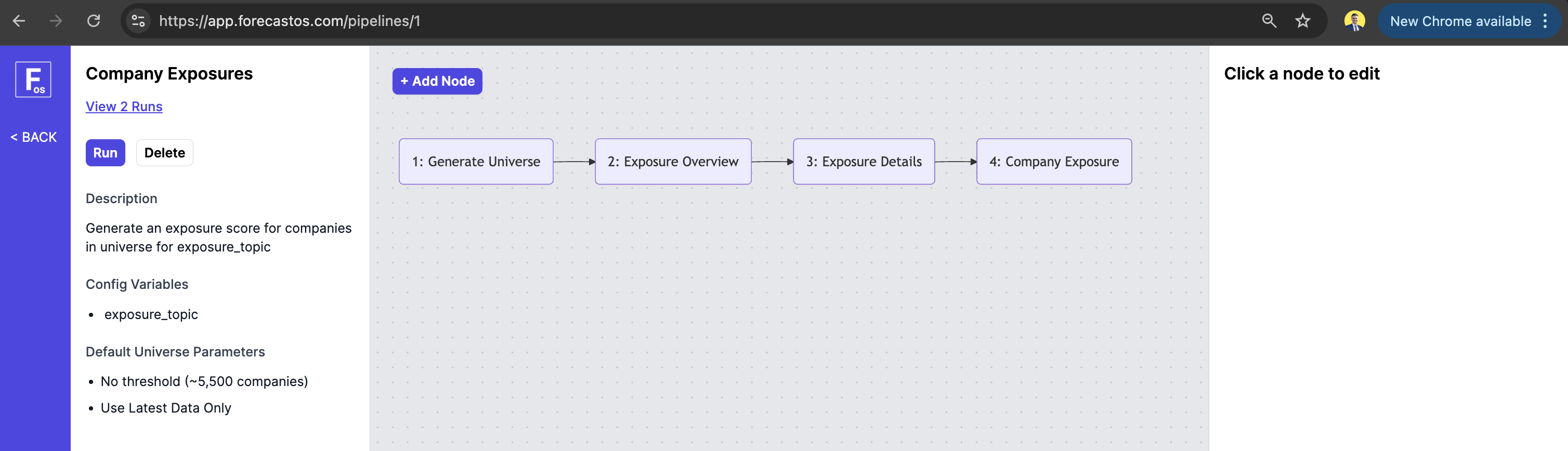
Custom pipelines can be built and inspected in the ForecastOS UI, where users visually compose nodes, configure transformations, and access outputs.
Injecting Data Into Prompt Templates
Prompt templates for a node can be edited in the UI by clicking the node in the pipeline editor. Prompts support dynamic data injection using our custom DSL (Domain-Specific Language).
DSL expressions are wrapped with the delimiters <!fos= ... /fos> and consist of a lookup method followed by one or more DSL function calls.
Example:
<!fos= LOOKUP_BY:{lookup_method}, {dsl_function} /fos>
Multiple DSL functions can be nested, where the output of one function becomes the input to another (e.g., func_a(func_b(func_c()))).
Below are the available lookup methods and DSL functions. In addition to the functions listed here, any function defined in forecastos.FeatureEngineeringMixin can also be called.
Lookup Methods
| Lookup Method | Description |
|---|---|
| DATETIME | Returns the most recent record available at or before the specified datetime. |
| TICKER_AND_DATETIME | Returns the most recent record for the specified ticker at or before the specified datetime. |
| CONSTANT | Returns the provided value directly without performing a data lookup. |
DSL Functions
| DSL Function | Description | Example Usage |
|---|---|---|
| feature_hub_feature | Returns a FeatureHub feature identified by its UUID. | <!fos= LOOKUP_BY:TICKER_AND_DATETIME, feature_hub_feature("<FEATUREHUB_UUID>") /fos> |
| filing_section_annual | Returns the text of a specified section from a company's annual filing. | <!fos= LOOKUP_BY:TICKER_AND_DATETIME, filing_section_annual("business") /fos> |
| pipeline_outputs | Returns a value from the JSON output of a previous pipeline node using the specified key. | <!fos= LOOKUP_BY:CONSTANT, pipeline_outputs("<KEY_NAME>") /fos> |
| pipeline_config_variables | Returns the value of a pipeline run variable using the specified key. | <!fos= LOOKUP_BY:CONSTANT, pipeline_config_variables("<KEY_NAME>") /fos> |
| pit_context | Returns point-in-time context data for the specified ID and key. | <!fos= LOOKUP_BY:DATETIME, pit_context(<PIT_CONTEXT_ID>, "summary") /fos> |
API Access
Pipeline run creation and associated outputs are accessible via API.
Example: Running Pipelines via API
curl -X POST "https://app.forecastos.com/api/v1/pipelines/<PIPELINE_ID>/runs" \
-H "Authorization: Bearer YOUR_API_TOKEN" \
-H "Content-Type: application/json" \
-d '{
  "generate_charts": true,
  "interval_frequency_days": 365,
  "include_new_annual_filings": true,
  "start_date": "2025-01-01",
  "end_date": "2026-01-01",
  "variables": {
    "var1": "value1",
    "var2": "value2"
  }
}'
Body Parameters
| Parameter | Type | Default | Required | Description |
|---|---|---|---|---|
| title | string | pipeline default | No | A title for your reference to identify this run. |
| team_ids | array of integers | pipeline default | No | Team IDs to associate with this run. |
| universe_id | integer | pipeline default | No | ID of the universe to use for this run. |
| generate_charts | boolean | pipeline default | No | If true, charts will be automatically generated once pipeline results are complete. |
| interval_frequency_days | integer | pipeline default | No | Number of days between generated results. |
| include_new_annual_filings | boolean | pipeline default | No | If true, additional results are generated when new annual filings become available. |
| start_date | string | "2016-01-01" | No | Only include data published from this date. Must be in YYYY-MM-DD format. |
| end_date | string | current date | No | Only include data published up to this date. Must be in YYYY-MM-DD format. |
| variables | object | - | Yes | A dictionary of variables for the pipeline. Must include keys for all expected pipeline variables. |
Response
{
  "id": 101,
  "pipeline_id": 6,
  "status": "running",
  "created_at": "2026-01-12T18:22:14.050Z"
}
Example: Fetching Pipeline Run Results via API
curl -X GET "https://app.forecastos.com/api/v1/pipelines/<PIPELINE_ID>/runs/<PIPELINE_RUN_ID>" \
-H "Authorization: Bearer YOUR_API_TOKEN" \
-H "Content-Type: application/json"
This returns a time-series CSV containing company-level results for your pipeline run.
Open-Source Access
The open-source ForecastOS Python library provides helpers for consuming pipeline outputs and integrating them into downstream research, risk, and portfolio workflows.
Example: Running Pipelines via OS
import forecastos as fos

run_pipeline_response = fos.Pipeline.run_pipeline(
  pipeline_id=6,
  config={
    "generate_charts": True,
    "interval_frequency_days": 365,
    "include_new_annual_filings": True,
    "start_date": "2025-01-01",
    "end_date": "2026-01-01",
    "variables": {
      "var1": "value1",
      "var2": "value2"
    }
}
)
Config Parameters
| Parameter | Type | Default | Required | Description |
|---|---|---|---|---|
| title | string | pipeline default | No | A title for your reference to identify this run. |
| team_ids | array of integers | pipeline default | No | Team IDs to associate with this run. |
| universe_id | integer | pipeline default | No | ID of the universe to use for this run. |
| generate_charts | boolean | pipeline default | No | If true, charts will be automatically generated once pipeline results are complete. |
| interval_frequency_days | integer | pipeline default | No | Number of days between generated results. |
| include_new_annual_filings | boolean | pipeline default | No | If true, additional results are generated when new annual filings become available. |
| start_date | string | "2016-01-01" | No | Only include data published from this date. Must be in YYYY-MM-DD format. |
| end_date | string | current date | No | Only include data published up to this date. Must be in YYYY-MM-DD format. |
| variables | object | - | Yes | A dictionary of variables for the pipeline. Must include keys for all expected pipeline variables. |
Example: Fetching Pipeline Run Results via OS
df_pipeline_run_results = fos.Pipeline.get_df(pipeline_id=6, run_id=19)
This returns a time-series DataFrame containing company-level results for your pipeline run.
Next: Hivemind PIT Context
Let's explore Hivemind PIT Context next.